Registration is limited to Google Gmail & MailRU & Yahoo & Yandex email addresses.
Do not create multi-accounts, you will be blocked!
Leaderboard
-
idduno19198373hza
Active Member2Points5Posts -
mathew
Active Member1Points100Posts -
EnchantedG42
Active Member1Points8Posts -

encrypted
Active Member1Points7Posts




Popular Content
Showing content with the highest reputation on 05/30/26 in Files
-
1 point
 Блек пососи хуец. Настолько сука тупой разраб что нахуй даже не в состоянии сам мапу сделать. Скоро будет еще вся форма с коина, ждите. Карты нет, есть интерьеры и пру рабочих систем если довести до ума. Скоро ликну еще данную карту но уже со всей формой.Free1 point
 -
 Its a saveinstance from EagleNation, expect some minor bugs from the bikes script, you just need a little adjustment for the bike scripts, its easy to do if you're already on this web xoxoFree1 point
 -
 Uhh, so this is my first asset on this website soooo hope it goes well. But, they are a toxic community and they do not care about their staff member for whore shit. So this is asseted by the old co owner of CORP/OSRP! Some vehicles are made by me which are now free to use!!! Most of the unmarks are made by me... #FuckUOakwood!Free1 point
 -
1 point
-
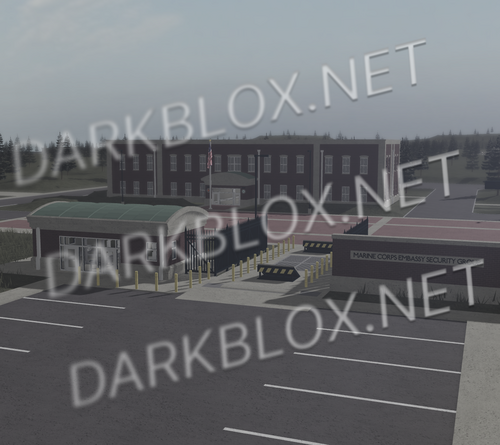 Marine Corps Embassy Security Group is an organization of the United States Marine Corps, whose detachments guard and protect U.S. Embassies across the globe. This map is based in Quantico, Virginia, and serves as the first training process of creating a Marine Security Guard (MSG). 5000×5000. ACS comes pre-loaded. This map includes: – Gate w/ Processing Station – Parade Square – Headquarters/Classroom Building – Rifle & Pistol Range (100M, 200M, 300M) – Gear Room (Headgear, Vests, Uniforms) – Embassy Breaching & Defense Training AreaFree1 point
 -
-1 points
 SVCARIO§ In case of an investigation by any federal entity or similar, I don't have any involvement with this group or with the people in it, I do not know how Im here, probably added by a third partyFree-1 points